Line Coverage: Lessons from JUnit

In unit testing, achieving 100% statement coverage is not realistic. But what percentage would good testers get? Which cases are typically not included? Is it important to actually measure coverage?

To answer questions like these, I took a look at the test suite of JUnit itself. This is an interesting case, since it is created by some of the best developers around the world, who care a about testing. If they decide not to test a given case, what can we learn from that?

Coverage of JUnit as measured by Cobertura

Coverage of JUnit as measured by Cobertura

Overall Coverage at First Sight

Applying Cobertura to the 600+ test cases of JUnit leads to the results shown above (I used the maven-enabled version of JUnit 4.11). Overall, instruction coverage is almost 85%. In total, JUnit comprises around 13,000 lines of code and 15,000 lines of test code (both counted with wc). Thus, the test suite that is larger than the framework, leaves around 15% of the code untouched.

Covering Deprecated Code?

A first finding is that in JUnit coverage of deprecated code tends be to be lower. Junit 4.11 contains 13 deprecated classes (more than 10% of the code base), which achieve only 65% line coverage.

JUnit includes another dozen or so deprecated methods spread over different classes. These tend to be small methods (just forwarding a call), which often are not tested.

Furthermore, JUnit 4.11 includes both the modern org.junit.* packages as well as the older junit.* packages from 3.8.x. These older packages constitute ~20% of the code base. Their coverage is 70%, whereas the newer packages have a coverage of almost 90%.

This lower coverage for deprecated code is somewhat surprising, since in a test-driven development process you would expect good coverage of code before it gets deprecated. The underlying mechanism may be that after deprecation there is no incentive to maintain the test cases: If I would issue a ticket to improve the test cases for a deprecated method on JUnit I suspect this issue would not get a high priority. (This calls for some repository mining research on deprecation and testing, in the spirit of our work on co-evolution of tests and code).

Another implication is that when configuring coverage tools, it may be worth excluding deprecated code from analysis. A coverage tool that can recognize @Deprecated tags would be ideal, but I am not aware of such a tool. If excluding deprecated code is impossible, an option is to adjust coverage warning thresholds in your continuous integration tools: For projects rich in deprecated code it will be harder to maintain high coverage percentages.

Ignoring deprecated code, the JUnit coverage is 93%.

An Untested Class!

In the non-deprecated code, there was one class not covered by any test:
runners.model.NoGenericTypeParametersValidator. This class validates that @Theories are not applied to generic types (which are problematic due to type erasure).

I easily found the pull request introducing the validator about a year ago. Interestingly, the pull request included a test class clearly aimed at testing the new validator. What happened?

  • Tests in JUnit are executed via @Suites. The new test class, however, was not added to any suite, and hence not executed.
  • Once added to the proper suite, it turned out the new tests failed: the new validation code was never actually invoked.

I posted a comment on the (already closed) pull request. The original developer responded quickly, and provided a fix for the code and the tests within a day.

Note that finding this issue through coverage thresholds in a continuous integration server may not be so easy. The pull request in question causes a 1% increase in code size, and a 1% decrease in coverage. Alerts based on thresholds need to be sensitive to small changes like these. (And, the current ant-based Cloudbees JUnit continuous integration server does not monitor coverage at all).

What I’d really want is continuous integration alerts based on coverage deltas for the files modified in the pull request only. I am, however, not aware of tools supporting this at the moment.

The Usual Suspects: 6%.

To understand the final 5-6% of uncovered code, I had a look at the remaining classes. For those, there was not a single method with more than 2 or 3 uncovered lines. For this uncovered code, various typical categories can be distinguished.

First, there is the category too simple to test. Here is an example from org.junit.Assume, in which an assumeTrue is turned into an assumeFalse by just adding a negation operator:

public static void assumeFalse(boolean b) {
  assumeTrue(!b);
}

Other instances of too simple to test include basic getters, or overrides for methods such as toString.

A special case of too simple to test is the empty method. These are typically used to provide (or override) default behavior in inheritance hierarchies:

/**
 * Override to set up your specific external resource.
 *
 * @throws if setup fails (which will disable {@code after}
 */
protected void before() throws Throwable {
    // do nothing
}

Another category is code that is dead by design. An example is a static only class, which need not be instantiated. It is good Java practice (adopted selectively in JUnit too) to make this explicit by declaring the constructor private:

/**
 * Protect constructor since it is a static only class
 */
protected Assert() {
}

In other cases dead by design involves an assertion that certain situations will never occur. An example is Request.java:

catch (InitializationError e) {
  throw new RuntimeException(
    "Bug in saff's brain: " +
    "Suite constructor, called as above, should always complete");
}

This is similar to a default case in a switch statement that can never be reached.

A final category consists of bad weather behavior that is unlikely to happen. This typically manifests itself in not explicitly testing that certain exceptions are caught:

try {
  ...
} catch (InitializationError e) {
  return new ErrorReportingRunner(null, e);
}

Here the catch clause is not covered by any test. Similar cases occur for example when raising an illegal argument exception if inputs do not meet simple validation criteria.

EclEmma and JaCoCo

While all of the above is based on Cobertura, I started out using EclEmma/Jacoco 0.6.0 in Eclipse for doing the coverage analysis. There were two (small) surprises.

First, merely enabling EclEmma code coverage caused the JUnit test suite to fail. The issue at hand is that in JUnit test methods can be sorted according to different criteria. This involves reflection, and the test outcomes were influenced by additional (synthetic) methods generated by Jacoco. The solution is to configure Jacoco so that instrumentation of certain classes is disabled — or to make the JUnit test suite more robust against instrumentation.

Second, JaCoCo does not report coverage of code raising exceptions. In contrast to Cobertura, JaCoCo does on-the-fly instrumentation using an agent attached to the Java class loader. Instructions in blocks that are not completed due to an exception are not reported as being covered.

As a consequence, JaCoCo is not suitable for exception-intensive code. JUnit, however, is rich in exceptions, for example in the various Assert methods. Consequently, the code coverage for JUnit reported by JaCoCo is around 3% lower than by Cobertura.

Lessons Learned

Applying line coverage to one of the best tested projects in the world, here is what we learned:

  1. Carefully analyzing coverage of code affected by your pull request is more useful than monitoring overall coverage trends against thresholds.
  2. It may be OK to lower your testing standards for deprecated code, but do not let this affect the rest of the code. If you use coverage thresholds on a continuous integration server,  consider setting them differently for deprecated code.
  3. There is no reason to have methods with more than 2-3 untested lines of code.
  4. The usual suspects (simple code, dead code, bad weather behavior, …) correspond to around 5% of uncovered code.

In summary, should you monitor line coverage? Not all development teams do, and even in the JUnit project it does not seem to be a standard practice. However, if you want to be as good as the JUnit developers, there is no reason why your line coverage would be below 95%. And monitoring coverage is a simple first step to verify just that.

Desk Rejected

One of the first things we did after all NIER 2013 papers were in, was identifying papers that should be desk rejected. What is a desk reject? Why are papers desk rejected? How often does it happen? What can you do if your paper is desk rejected?

A desk reject means that the program chairs (or editors) reject a paper without consulting the reviewers. This is done for papers that fail to meet the submission requirements, and which hence cannot be accepted. Filtering out desk rejects in advance is common practice for both conferences and journals.

To identify such desk rejects for NIER 2013, program co-chair Sebastian Elbaum and I made a first pass through all 160+ submissions. In the end, we desk rejected around 10% of the submissions (a little more than I had anticipated).

Causes for reject included problems in:

  • Formatting: The paper does not meet the 4 page limit;
  • Scope: The paper is not about software engineering;
  • Presentation: The paper contains, e.g., too many grammatical problems;
  • Innovation: The paper does not explain how it builds upon and
    extends the existing body of knowledge.

Of these, for NIER the formatting was responsible for half of the desk rejects.

Plagiarism
A potential cause that we did not encounter is plagiarism (fraud), or its special form self-plagiarism (submitting the same, or very similar, papers to multiple venues).

In my experience, plain plagiarism is not very common (I encountered one case in another conference, where we had to apply the IEEE Guidelines on Plagiarism).

Self-plagiarism is a bigger problem as it can range from copy-pasting a few paragraphs from an earlier paper to a straight double submission. While the former may be acceptable, the latter is considered a cardinal sin (your paper will be rejected at both venues, and reviewers don’t like reviewing a paper that cannot be accepted). And there are many shades of grey in between.

Notifications
We sent out notifications to authors of desk rejected papers within a few days after the submission deadline (it took a bit of searching to figure out that the best way to do this is to use the delete paper option from EasyChair). Thus, desk rejects not only serve to reduce the reviewing load of the program committee, but also to provide early feedback to authors whose papers just cannot make it.

Is there anything you can do to avoid being desk rejected?
The simple advice is to carefully read the submission guidelines. Besides that, it may be wise to submit a version adhering to all criteria early on when there is no immediate deadline stress yet. This may then serve as a fallback in case you mess up the final submission (uploading, e.g., the wrong pdf). Usually chairs have access to these earlier versions, and they can then decide to use the earlier version in case (only) the final version is a clear desk reject (for NIER this situation did not occur).

Is there anything you can do after being desk rejected?
Usually not. Most desk rejects are clear violations of submission requirements. If you think your desk reject is based on subjective grounds (presentation, innovation), and you strongly disagree, you could try to contact the chairs to get your paper into the reviewing phase anyway. The most likely outcome, however, will still be a reject, so it may not be in your self-interest to postpone this known outcome.

Submission times
And … are desk rejects are related to the paper submission time? Yes, there is a (mild) negative correlation: For NIER, there were more desk rejects in the earlier than in the later submissions. My guess is that this is quite common. There seem to be authors who simply try their same pdf at multiple conferences, hoping for an easy conference with little reviewing only.

Acceptance rates
This brings me to the final point. Conferences are commonly ranked based on their acceptance ratio. The lower the percentage of accepted papers, the more prestigious the conference is considered. The most interesting figure is obtained if acceptance rates are based on the serious competition only — i.e., the subset of papers that made it to the reviewing phase. Desk rejected papers do not qualify as such, and hence should  not be taken into account when computing conference acceptance rates.

Library Updating. Risk it Now, or Risk it Later?

Chances are your software depends on external libraries. What should you do, if a new version of such a library is released? Update immediately? But what if the library isn’t backward compatible? Should you swallow the pill immediately, and make the necessary changes to your system so that it can work with the new version? Or is it safe to wait for now, and avoid immediate cost and risk?

Together with Steven Raemaekers and Joost Visser (both from SIG), we embarked upon a reseach project in which we seek to answer questions like these. We are looking at library and API stability, as well as at the costs and consequences of library incompatibilities.

A first result, in which we try to measure library stability, has been presented at this year’s International Conference on Software Maintenance. The corresponding paper starts with a real life example illustrating the issues at hand.

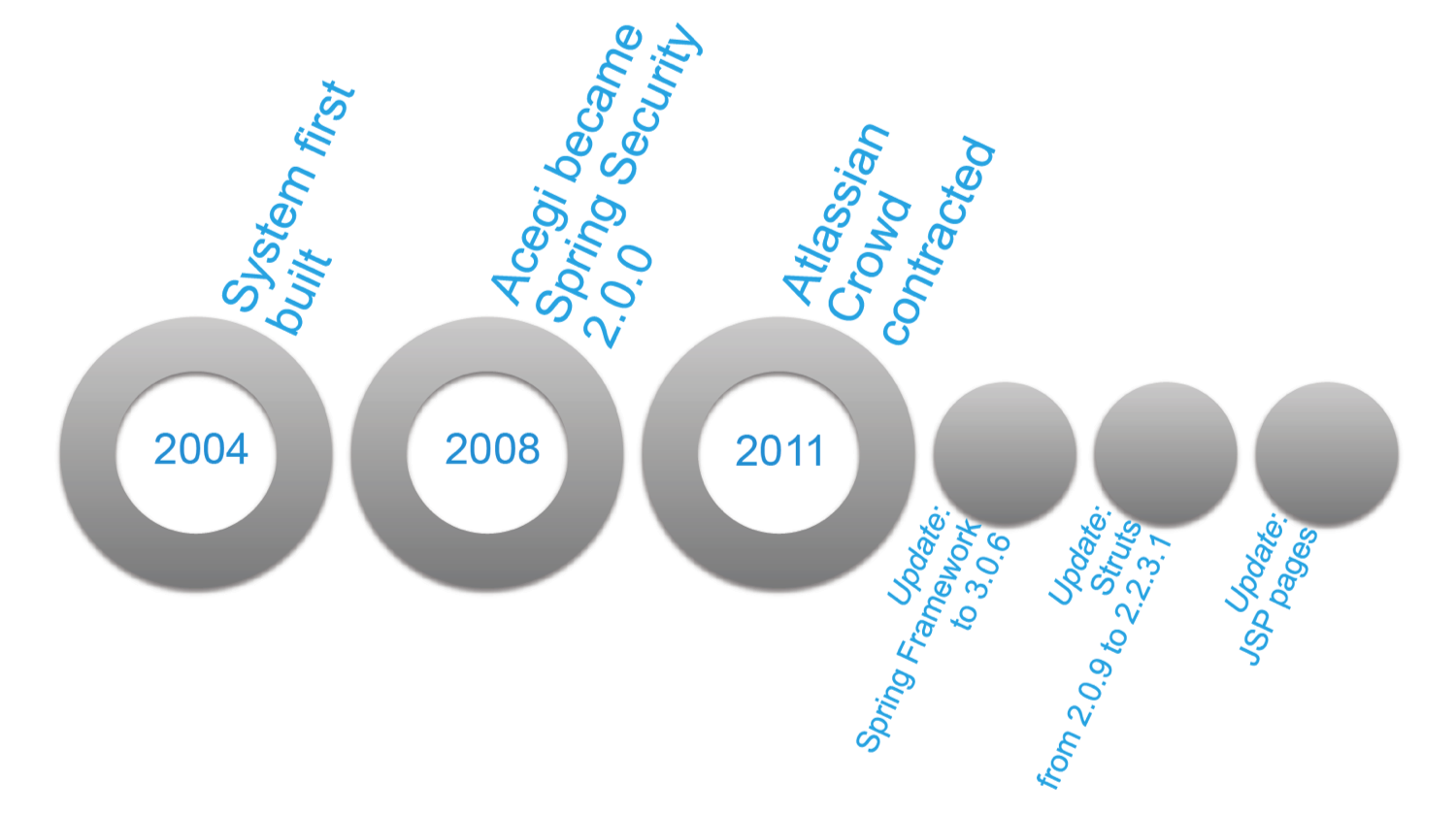
The system in this example comprises around 200,000 lines of Java code, divided over around 4000 classes. The application depends on the Spring Framework, Apache Struts, and Hibernate. Its update history is shown below.

History of the system and the library it uses

The system was built in 2004. Third-party library dependencies were managed using Maven. Version numbers of the latest versions which were available in 2004 were hard-coded in the configuration files of the project. These libraries were not updated to more recent versions in the next seven years.

The system used version 1.0 (from 2003) of the Acegi authentication and security framework. In 2008, this library was included in Spring, and renamed into Spring Security, then at 2.0.0. As time passed, several critical safety-related bug fixes and improvements were added to Spring Security, as well as a number of changes breaking the existing API.

One might argue that keeping a security library up to date is always a good idea. But since the development team expected compatibility issues when upgrading the Acegi library, the update to Spring Security was deferred as long as possible.

In 2011, a new feature, single sign-on, was required for the system. To implement this, the team decided to adopt Atlassian Crowd.

Unfortunately, the old Acegi framework could not communicate with Atlassian Crowd. The natural replacement for Acegi was Spring Security, which was then in version 3.0.6.

However, the system already made use of an older version of the general Spring Framework. Therefore, in order to upgrade to Spring Security 3.0.6, an upgrade to the entire Spring Framework had to be conducted as well.

To make things worse, the system also made use of an older version (2.0.9) of Apache Struts. Since the new version of Spring could not work with this old version of Struts, Struts had to be updated as well.

Upgrading Struts not just affected the the system’s Java code, but also its Java Server Pages. Between Struts 2.0.9 and 2.2.3.1 the syntax of the Expression Language used in JSP changed. Consequently, all web pages in which dynamic content was presented uinsg JSP had to be updated.

Eventually, a week was spent to implement the changes and upgrades.

The good news was that there was an automated test suite available consisting of both JUnit and Selenium test cases. Without this test suite, the impact of this update would have been much harder to assess and control.

This case illustrates several issues with third-party library dependencies.

  1. Third party libraries introduce backward incompatibilities.
  2. Backward incompatibilities introduce costs and risks when upgrading libraries.
  3. Backward incompatibilities are not just caused by direct dependencies
    you control yourself but also by transitive ones you do not control.
  4. There likely will come a moment in which upgrading must be done: To fix bugs, to improve security, or when the system’s functionality needs to be extended.
  5. The longer you postpone updating, the bigger the eventual pain. As your system grows and evolves, the costs and risks of upgrading an old library increase. Such an accumulation of maintenance debt may lead to a much larger effort than in the case of smaller incremental updates.

In short, not upgrading your libraries immediately is taking the bet that it never needs to be done. Upgrading now is taking the bet it must be done anyway, in which case doing it as soon as possible is the cheapest route.

Paper "Measuring Software Library Stability through Historical Version Analysis

The full ICSM 2012 research paper.

In our research project, we seek to deepen our insight in these issues. We are looking at empirical data on how often incompatabilities occur, the impact of library popularity on library stability, the effort involved in resolving incompatibilities, and at ways in which to avoid them in the first place. Stay tuned!

Should you have similar stories from the updating trenches to share with us, please drop us a line!

Paper Arrival Rates

As the deadline passed, I just closed the submission site for ICSE NIER 2013. How many hours in advance do authors typically submit their paper?

To answer that question, I collected some data on the time at which each paper was submitted. (I just looked at initial submissions, not at re-submissions). Here is a graph showing new paper arrivals, sorted by hours before the deadline, grouped in bins of 2 hours.

As you can see, we received a little less than 30 submissions more than 2 days in advance. But the vast majority likes to submit in the final 24 hours. The last paper was submitted just 5 minutes before the deadline.

Accumulating this graph and displaying the data as percentage yields the following chart:

This gives some insight in the percentage of papers submitted at different time slots before the deadline.

Let’s draw the following easy to remember conclusions from this graph:

  • 1/6th of the papers are submitted more than 48 hours ahead of time.
  • 1/3d of the papers are submitted 24 hours before the deadline
  • Half of the papers are submitted 14 hours before the dealine
  • 2/3d of the papers are submitted 10 hours before the deadline
  • 1/6th of the papers are submitted in the final 4 hours before the deadline

Is this relevant? If this is valid, as a conference organizer you can guestimate the number of submissions, say, 24 hours ahead of time, which is when you’d have 1/3d of the papers in.

But also if you’re an author this can be interesting. Conference systems like EasyChair give your paper an ID that equals the number of submissions so far. So if you submit at, say, 10 hours before the deadline, and get paper ID 200, the chart suggests that you may end up competing with 300 submissions in total.

The chart may very well be different for other conferences. NIER is part of ICSE which is held in California, with a deadline at 12pm Pago Pago time, on a Friday, soliciting 4-page papers, without requiring pre-submission of abstracts. These are all circumstances that will affect submission behavior. If you have pointers to similar data for other conferences let me know, and I’ll update the post.

Enjoy!

Teaching Reactive Programming

One of the new courses at the TU Delft MSc Computer Science in 2012 was on reactive programming. The students loved this course, and I had a great time too. What was so good about it?

Format
The course was taught by Erik Meijer, creator of the .NET reactive extensions framework Rx. Erik works at Microsoft, Redmond, and has a part time appointment at TU Delft. The lectures thus were packed in two weeks, followed by several student presentations over Skype after Erik had returned to Redmond.

Book: Programming Reactive Extensions and LINQ

Content
The course content included big data, asynchronous operations on observable collections, push versus pull, Pip Coburn’s change function, the role of abstraction, monads, LINQ, coSQL, event processing, schedulers, and the reactive extensions architecture. Course material included Programming Reactive Extensions and LINQ by Jesse Liberty and Paul Betts.

Labwork
Students subsequently used this understanding of reactive programming to build a cloud-based (Windows) phone app, to be put in the market place. Results include one app to keep an eye on your stack overflow account, and two apps focused on train delays. Some helper libraries developed by the students are now on github, such as a proxy for the Dutch Railways API, and ExchangeLINQ, a LINQ query provider for the Stack Exchange API.

The Engineer as Educator
One thing that made this course special was Erik sharing his extensive experience in API design. He explained the actual tradeoffs he and his team made in the design of Rx — for example when deciding that subscribing to an IObservable should return an IDisposable in order to allow the developer to stop the subscription.
In order to explain his design decisions, Erik naturally made use of his background in functional programming. To answer the student’s questions, he used monads, co- and contravariance, category theory, and trampolines, to name a few. Thus, the course demonstrated how a thorough understanding of programming language theory is a prerequisite for good API design. More than anything, this course motivated students to dive into the theory of (functional) programming.

Pizza
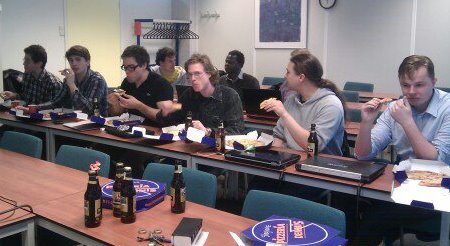
In the final session, the students presented their apps and their reactive programming skills. The IDEs were opened, and the students experienced what it feels like when a senior engineer like Erik reviews your code. The session took place at 6pm over Skype, with students having pizza and beer, while Erik was having his morning coffee in Redmond.

Final Reactive Programming Presentations

Teaching Testing in Year One

Starting 2013/2014, TU Delft will run a revised curriculum for the bachelor computer science. The software testing course that I have been teaching to 2nd and 3rd year CS students will move from to the (end of) the first year.

This is an exciting prospect. It confirms that testing is not an afterthought, but something that should be built into software development right from the start.

But can it be done? What should freshmen coming straight from high school be taught before they can start with testing? And what should a first year testing course contain?

To build up the required knowledge, the TU Delft curriculum anticipates three pre-testing courses.

  1. In the first, students learn about object-oriented programming, covering topics ranging from simple loops to inheritance, polymorphism, and interfaces. They will even learn a bit about the mechanics of testing their code automatically.
  2. Subsequently, they use the acquired programming skills in a simple project. They learn to work in teams, to write software according to requirements provided by others, and to share their (UML) design diagrams with other team members.
  3. As the third step, they learn about data structures such as linked lists or binary search trees, and learn to use recursion. These courses (object-oriented programming, a project, and data structures), are scheduled for the first three quarters of the first year.

Then in the fourth quarter, a dedicated course on software testing comes in. The course should hook students to innovative forms of testing for the rest of their lives. Here’s what I have in mind for that.

The practical basis will include exploratory testing, behavior-driven development, and the use of testable scenarios to specify requirements. With respect to unit testing, the students will learn JUnit, the use of build tools (maven), coverage analysis, and the use of continuous integration tools (Jenkins). I even hope to get them to understand a mocking framework like Mockito. Students will apply these techniques to a small existing applications (JPacman) which they will have to adapt and test.

The more theoretical basis will be provided by the systematic derivation of test cases from models, such as state machines or decision tables. Furthermore, I’ll elaborate on different adequacy models (beyond statement coverage!) as well as combinatorial testing techniques (e.g., pairwise testing).

This being an academic course, it will also include a critical reflection on the tools and techniques covered. We’ll identify strengths and weaknesses, and see how today’s hottest research aims at addressing these weaknesses.

Well, perhaps this is all too ambitious. I will try, and we will see. Luckily, TU Delft is not the first university to move testing to the first year: Eindhoven is a notable other example, and I am sure there are more (although perhaps not many). “Test early, test often” — learn it early, apply it often.

Automated GUI Testing with Google’s WindowTester

One of the topics that popped up a couple of times in our “test confession” interviews with Eclipse developers, is the tension between unit testing and GUI testing. Does an application with a thorough unit test suite require user interface testing? And what about the other way around? What does automated GUI testing add to standard unit testing? Is automated GUI testing a way to involve the end-users in the testing process?

wintester-recorder

In order to fully understand all arguments, I decided to play around a little with WindowTester, a capture-and-playback automated GUI testing tool made available by Google, with support for Swing and SWT.

My case study is JPacman, a Java implementation of a game similar to Pacman I use for teaching software testing. The plan of attack is simple: take the existing use cases, turn each into a click trail, record the trail, and generate a (JUnit-based) test suite.

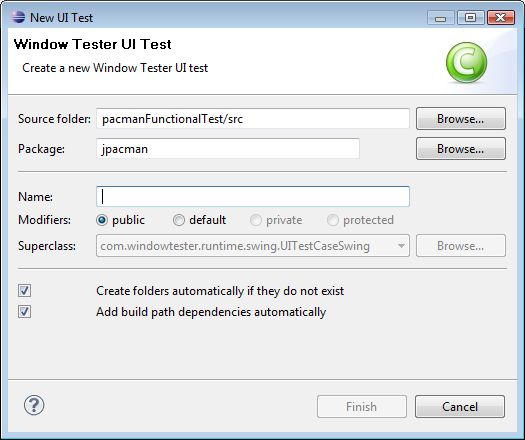
My first use case is simple: enter and exit the game. To that end, I open the recorder, launch pacman, and press the red "Record" button in Eclipse. Then I press the start button in the game, followed by the exit button, which quits the application. WindowTester then prompts for the place to save this interaction:

save-testcase

After that, WindowTester generates the following JUnit test case:

public class StartAndExitUseCase extends UITestCaseSwing {

    import ...

    public StartAndExitUseCase() {
        super(jpacman.controller.Pacman.class);
    }

    public void testStartAndExitUseCase() throws Exception {
        IUIContext ui = getUI();
        ui.click(new JButtonLocator("Start"));
        ui.click(new JButtonLocator("Exit"));
        ui.wait(new WindowDisposedCondition("JPacman"));
    }
}

The next use case requires me to make moves in several directions.
Unfortunately, WindowTester can’t record arrow keys. To resolve this, I decide to modify Jpacman to use good old vi-navigation (‘hjkl’).

I then open JPacman, to make moves in all directions. Unfortunately, I’m a bit slow, and I bump into one of the randomly moving monsters, after which I die.

This is a deeper issue: Parts of the application, in particular the random monsters, cannot be controlled via the GUI. Without such control, it is impossible to have test cases with reproducible results.

My solution is to create a slightly different version of Pacman, in which the monsters don’t move at all. In fact, I happened to have the code for this ready already in my test harness, as I used such a version for doing unit testing.

This works, and the result is a test case passing just fine:

public void testSimpleMove() throws Exception {
    IUIContext ui = getUI();
    ui.click(new JButtonLocator("Start"));
    ui.enterText("jlkhhh");
}

The test doesn’t assert much, though. Luckily, WindowTester has a mechanism to insert “hooks” while recording, prompting me for a name of the method to be called.

hook

This results in the following code:

public void testSimpleMoveWithAsserts() throws Exception {
    IUIContext ui = getUI();
    ui.click(new JButtonLocator("Start"));
    ui.enterText("l");
    assertCorrectMoveToTheLeft();
    ui.enterText("j");
    assertCorrectMoveDown();
}

protected void assertCorrectMoveDown() throws Exception {
    // TODO Auto-generated method stub
}
...

WindowTester generates empty bodies for the two assert methods, leaving it to the developer to insert appropriate code. This raises two issues.

The first is that the natural way (at least for me as a tester) to verify that a move down was conducted correctly is to ask the position of the player to the appropriate objects. But from the GUI, I don’t have access to these. My work around is to adjust Pacman’s “main” method, to make the underlying model available through a static reference. This results in the following code:

protected void assertCorrectMoveDown() {
    Pacman pm = SimplePacman.instance();
    assertEquals(1, pm.getEngine().getPlayer().getLastDy());
}

Writing such an assertion requires good knowledge of the underlying API, and a bit of luck that the API exposes a method to witness the desired effect.

My next use case involves a hungry Pacman consuming a dot, which earns the player 10 points. Doing this in a way similar to the previous use case iss simple enough. Would it also be possible to assert that the proper number of points are displayed correctly in the GUI? This requires getting hold of the appropriate JTextField, and checking its content before and after eating a dot.

To support this, WindowTester offers a number of widget locators. An example is the locator used above to find a JButton labeled with “Start”. Other types of locators make use of patterns, the hierarchical position in the GUI, or a unique name that a developer can give to widgets. I use this latter option, allowing me to retrieve the points displayed as follows:

private int getPointsDisplayed() throws WidgetSearchException {
    WidgetReference<JTextField> wrf = 
        (WidgetReference<JTextField>) 
        getUI().find(new NamedWidgetLocator("jpacman.points"));
    JTextField pointsField = (JTextField) wrf.getWidget();
    return Integer.parseInt(pointsField.getText());
}

Thus, I can test if the points actually displayed are correct.

The remaining use cases can be handled in a similar way. Some use cases require moving monsters, for which having access to the GUI alone is not enough. Another use case, winning the game, would require a lot of clever moves on the regular board: instead I create a custom small and simple board, in which winning is easy.

I less and less make use of the recording capabilities of WindowTester: instead I directly program against its API. This also helps me to make the test cases easier maintainable: I have a “setUp” for pushing the “Start” button, a “tearDown” for pushing “Exit”, and I can make use of other JUnit best practices. Moreover, it allows me to create a small layer of methods permitting more abstract test cases, such as the method above to obtain the actual points displayed.

Are the resulting test cases useful? I recently changed some of the GUI logic, turning a complex if-then-else to handle keyboard events into a much cleaner switch statement (inspired by a warning PMD was giving me). All unit test cases passed fine. I almost committed, but then decided to run the GUI test suite as well. It failed. I first blamed WindowTester, but then I realized it was my own fault: I had forgotten some breaks in my switch and the events were not handled correctly. The GUI test suite found a fault my unit test suite had not found.

In summary, automated GUI testing is neither a replacement for unit nor for acceptance testing. It is a useful tool for covering the GUI logic of your application. The recording capabilities can be helpful to try out certain scenarios. In the end, however an explicitly programmed test suite, making use of the GUI framework’s API, seems easier to maintain. In this way, JUnit best practices related to test suite organization as well as the application’s observability and controllability can be directly applied to your GUI test suite as well.


(This is post originally appeared February 2011 as “Swinging Test Suites with WindowTester” on the Eclipse Study blog)